8 AM, furnace maintenance. The tech is at the door. Nobody answers.
The customer forgot the appointment, the furnace room is blocked, or the key is with the neighbors – and nobody told the tech. The trip was wasted, and a new slot is hard to find: in Germany, trade businesses are booked 8.7 weeks out on average (ZDH).
Here, the customer gets a short message the day before with the arrival window and a checklist for the job, and replies with one tap. On the day of the job, the tech taps “Heading out now,” and the customer knows when the doorbell will ring.
Try it yourself: from the day before to the front door
First, you are Ms. Miller. On Monday at 10 AM, she gets the message about her appointment on Tuesday. Then you are Jake, the tech, on Tuesday morning. At the top, choose how Ms. Miller can be reached. Takes about two minutes.
Who sees what – and who doesn’t
The customer gets a message about the appointment, not an ad: arrival window, type of job and what they can get ready. They reply with one tap or on their appointment page – no app, no account.
The office only gets what it needs to act on: a callback with the phone number when a customer wants a call or needs to reschedule, and every morning a list of the appointments that are still open.
The office can’t see when a tech headed out.
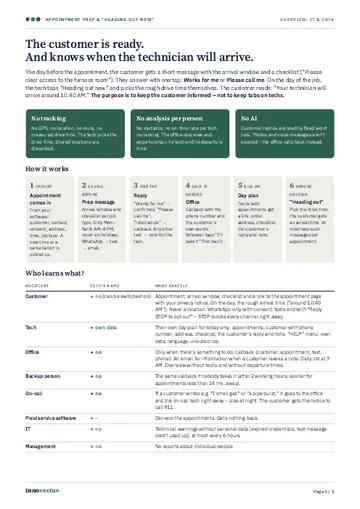
| Situation | Customer | Tech | Office |
|---|---|---|---|
| 24 hours before the appointment | Arrival window and checklist – WhatsApp with consent, otherwise a text with a link, otherwise email | – | nothing |
| Customer says “Works for me” | a short thank-you | “confirmed” on the day plan | nothing |
| Customer writes a note | “noted” | reads it before the drive | a short email, just for information |
| Please call, reschedule, sick | “we’ll call you” | “office is handling it” | callback with phone number |
| No way to reach them, or too short notice | no message | – | on the morning list: “quick call?” |
| “Heading out now” | arriving around … (also on the appointment page) | confirmation | nothing |
| Gas smell, water, smoke | emergency number right away, no do-it-yourself instructions | – | on-call service and office right away, even at night |
Honest, not overpromised
The system makes sure the customer and the tech know what’s coming. That’s all it promises.
24 hours before the appointment, but only between 8 AM and 8 PM and not on Sundays or holidays. If that time falls at night or on the weekend, it goes out earlier.
Appointment Monday 8 AM → message on Saturday by 7:45 PMIt doesn’t send reminder after reminder. Anyone who doesn’t reply shows up on the office’s morning list.
“Works for me,” “ok” or 👍 count as a confirmation. “Reschedule,” “sick” or “please call” become a callback. Anything else is a note for the tech.
It never reschedules on its own and doesn’t change anything in your software. New appointments are made by the office.
Before the drive, they pick roughly how long it will take. The customer reads “around 10:35 AM” and a line saying it’s an estimate.
It doesn’t know any location or traffic. Nothing is measured.
WhatsApp and the text message provider report whether it was delivered. If not, it goes out by text or email instead. If nothing gets through, the office finds out for the prep message, and the tech for the arrival time.
It doesn’t claim the customer has read the message.
What the system doesn’t do
It doesn’t track anyone
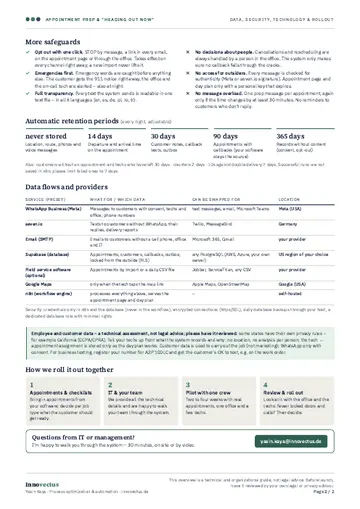
No GPS, no route, no drive-time tracking. Only the arrival time is stored with the appointment – and deleted after 14 days.
It doesn’t keep score per tech
No statistics, no punctuality list. The office overview and export don’t show any tech.
No WhatsApp without consent
Without consent, the customer gets a text or an email. Reply STOP or one click, and it stops right away.
No message overload
One prep message per appointment, at most two arrival updates. A double tap doesn’t send anything twice.
It doesn’t decide on its own
Cancellations and rescheduling are always handled by a person in the office – the system just makes sure nobody gets forgotten.
No do-it-yourself in an emergency
If someone writes “gas smell” or “water coming through the ceiling,” they get the emergency number and the on-call service is notified right away.
What you need
| Component | Default setup | Alternatives / your systems |
|---|---|---|
| Database | Required. Supabase (US region), free up to mid-size | any PostgreSQL: your own server, AWS, Azure |
| Messages to customers, techs & office | WhatsApp Business (Cloud API) in 6 languages – customers only with consent | text messages and email as a second channel |
| Text messages to customers without WhatsApp | seven.io, with a link to the appointment page | Twilio or another text message provider |
| any mailbox via SMTP | Microsoft 365 / Outlook | |
| Appointments | Import from your field service software (export or webhook, field names are matched at setup) | Jobber, ServiceTitan, Housecall Pro, Outlook calendar, Excel/CSV |
| Artificial intelligence | Not needed. Replies are read by fixed rules | – |
| Automation | n8n, self-hosted | – |
Running costs (ballpark for about 400 appointments a month, half WhatsApp and half text messages): roughly $60–140 a month for WhatsApp, text messages, database and server. Text message prices depend on your provider and US carrier fees.
Prefer text messages or email instead of WhatsApp? Text messages are built in: with one setting, customers get a text first (or email only) and simply reply “OK” or STOP. We set it up the way your customers prefer.
Setup: We set the system up with you, connect your appointments, and agree on checklists, arrival windows and wording with your office.
Documents for IT, management & the office
Everything that needs to be reviewed before you start – in one package, for everyone who has a say.
What’s inside
The overview is written for management and the office, in plain language. The rest is for your IT team.
- PDFOverview: IT & data2 pages: who sees what, where data is stored, deletion, security, rollout
- JSONWorkflow ready to importfor n8n, self-hosted – no credentials included
- SQLDatabase scriptSupabase (US region) or any PostgreSQL
- PDFSetup guide with checkliststep by step, with a self-check before go-live
Download the package
Get it right away with the code from your LinkedIn message – or have the link sent to your inbox.
Frequently asked questions
Can the customer see where my tech is right now?
No. The customer only gets a time the tech picked, like “around 10:35 AM.” There’s no map and no location, and the office can’t see when anyone headed out either.
What happens if the customer doesn’t reply?
The customer doesn’t get another reminder. The appointment shows up on the office’s morning list under “no reply – quick call?”, together with appointments without a way to reach the customer and those booked at short notice.
Does the customer have to install an app?
No. With WhatsApp, they reply right in the chat. Without WhatsApp, they get a text message with a link to their appointment page – a simple web page without a login, where they confirm, ask for a call or leave a note.
Will my techs feel tracked by “Heading out now”?
There’s no tracking and no reporting, and the arrival time is deleted after 14 days. Your techs pick the drive time themselves, and their day plan says so in plain words. The overview in the package explains this for management and your team. This is our technical assessment, not legal advice.
Where do the appointments and checklists come from?
The appointments come from your software, as an export or automatically via webhook – Jobber, ServiceTitan, Housecall Pro, any other software and even Excel work. You set up the checklists once for each type of job, for example “Furnace maintenance: clear access to the furnace.” Without a checklist, a general line is sent.
What does it cost?
On an ongoing basis, only the fees for the services – you’ll find the ballpark above under “What you need.” The setup effort mostly depends on where your appointments come from. You’ll get a fixed quote up front.
Could this work for your business?
We’ll figure out together whether it’s a good fit.
Book a no-obligation call