Copper pipe ordered at $3.40/ft.
Billed at $3.75/ft. Who catches it before the invoice gets paid?
Order confirmation, delivery note, invoice: with hundreds of line items a month, there’s rarely time to check every line against the purchase order. And prices are moving fast – in Germany, businesses paid 34.6% more for copper and copper semi-finished products in August 2026 than a year earlier. Destatis
This system checks every supplier document the moment it arrives – against your purchase order, what was actually delivered and the prices you agreed on. If everything matches, the invoice goes on accounting’s approval list. If something’s off, your purchasing team gets the line item and the extra charge on their phone. Nothing gets disputed or paid until a person taps a button.
- Your purchase orderPO B-10423/4" copper pipe150 ft × $3.403/4" ball valve6 pcsFreight–by email
- Order confirmationOC 47113/4" copper pipe150 ft × $3.753/4" ball valve6 pcsFreight$45.00$97.50 extra
- Delivery note · photoDN 551203/4" copper pipe150 ft3/4" ball valve4 pcsPipe insulation150 ft“2 ball valves missing”
- Invoice · e-invoiceINV 882133/4" copper pipe150 ft × $3.753/4" ball valve6 pcsFreight$45.00Bank detailson filedon’t pay
Try it yourself: the checking desk
Three documents for the same purchase order. Pick one – it’s laid next to the PO and checked line by line. Then you decide on your purchasing team’s phone, and below you’ll see accounting’s approval list. About a minute per document.
dated 10/2/2026 to Summit Supply Co. · requested delivery 10/8 · installation starts 10/13 · jobsite: 12 School Street
sent to the documents inbox by BCC
Accounting’s approval list
Overview via “LIST” or the daily list at 7:30 a.m.Only accounting or management can approve – in one batch, with a single click. You pay the way you always do, through your accounting software or bank.
Every document is read the most accurate way it allows
Each document is filed exactly as it came in, then read. The more precise the reading, the less anyone has to double-check by hand.
E-invoice
XRechnung and ZUGFeRD/Factur-X – including the XML file embedded in a PDF – are read without AI. Every number is exactly what the supplier sent.
PDF with text
The AI only maps the text to the right fields. Every number, item number and PO number has to appear word for word in the document – otherwise it counts as not read.
Photo or scan
The AI reads the image, and values from a photo are clearly flagged as such. Several pages sent together count as one delivery note; a text or voice message sent with them becomes the note.
Quantity × price = line amount, line items = subtotal, subtotal + tax = total. If that doesn’t add up, something was probably misread: the document goes on the daily list as “please take a look” – without a discrepancy alert. The AI only reads; fixed rules with your tolerances decide what counts as a discrepancy (e.g. a price more than 1% and more than 5 cents off, or a delivery date more than 2 business days past the requested date).
What the system doesn’t do
It doesn’t pay anything
“Ready to pay” only shows up on a 100% match. Only accounting or management can approve, with a click. The system writes nothing to your accounting software except – if you want – the document itself.
It doesn’t dispute on its own
The complaint is a fixed template (German or English) filled in with the values from the document and the PO, and it only goes out after “Send now.” You can edit it; any new amounts in the text are checked before it’s sent.
The AI doesn’t decide
It only reads. Numbers only count if they appear word for word in the document. Instructions hidden in a document are ignored, and bank details in the PDF text are blacked out before the AI sees them.
It doesn’t guess
A document is only matched to an order by the PO number on it. If the number is missing, it suggests a match with a button (“Does this document belong to B-1042?”) – and a person confirms.
It doesn’t skip a warning
New bank details, an unknown VAT ID or a duplicate invoice: only accounting or management can close that warning – with “Confirmed by phone” or “Checked: no duplicate.”
It doesn’t rate employees
Lists and the monthly overview count by supplier, never by person. Who clicked what is only kept as a record on the document. Photos: delivery notes only, please – they’re filed, not stored in the database.
What management sees
On the first business day of each month, you get an overview by supplier: how many documents, how many discrepancies by type, how much was overcharged and what was credited back.
That way you walk into your next supplier meeting prepared: you can see in black and white where prices went up without notice, how often you were billed incorrectly and what you got back in the end – solid ground for your next price negotiation.
Plus, the overview of all open documents is always one message away: text “LIST” on WhatsApp and open the link. Purchasing and accounting get a daily list at 7:30 a.m. on business days – only when something is waiting.
| Supplier | Documents | Discrepancies | Price | Overcharged (net) | Credited |
|---|---|---|---|---|---|
| Summit Supply Co. | 38 | 5 | 3 | $412.60 | $97.50 |
| Northside Tile LLC | 12 | 1 | 0 | $48.00 | $0.00 |
| Cedar Lumber Co. | 9 | 0 | 0 | $0.00 | $0.00 |
What you need
| Component | Default setup | Alternatives / your systems |
|---|---|---|
| Database | Required. Supabase (EU, Frankfurt), free up to mid-size | any PostgreSQL: your own server, IONOS, STACKIT, Azure |
| Receiving documents | a documents inbox (IMAP), e.g. documents@yourcompany.com | Microsoft 365 / Outlook, Gmail |
| Purchase orders & prices | PO emails copied to the inbox, price lists imported | QuickBooks, ERP, Excel – imported as CSV/JSON |
| Filing the originals | Google Drive | SharePoint / OneDrive |
| Team messages | WhatsApp Business – team only, never suppliers | SMS, Microsoft Teams, email |
| Complaints to suppliers | your purchasing inbox – replies come back to purchasing | Microsoft 365, Gmail |
| AI (reading documents) | OpenAI (US): gpt-4.1-mini, gpt-4.1 for photos | EU: Azure OpenAI, Mistral, IONOS AI Model Hub, STACKIT |
| Accounting (optional) | Lexware Office – document upload only, can be turned off | sevDesk, DATEV |
| Automation | n8n, self-hosted on a server in the EU | – |
Running costs (ballpark for about 300 documents a month): roughly €15–60 a month for AI, WhatsApp, database and server. You most likely already have Google Drive and Lexware Office.
Text messages or email instead of WhatsApp: WhatsApp is the default, but your team can get text messages (SMS, for example through Twilio) or email instead – we handle the swap during setup.
Setup: We set up the system with you and agree on suppliers, tolerances and PO numbers with your purchasing and accounting teams.
Documents for IT, accounting & data privacy
Everything that needs to be reviewed before you start – in one package, for everyone who has a say.
What’s inside
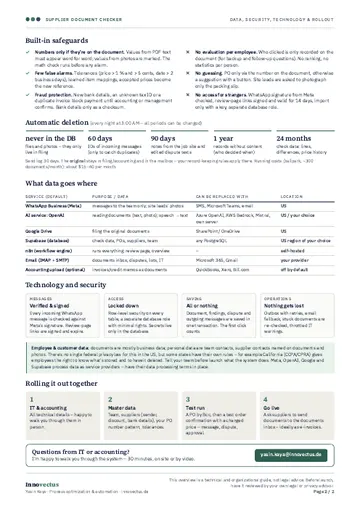
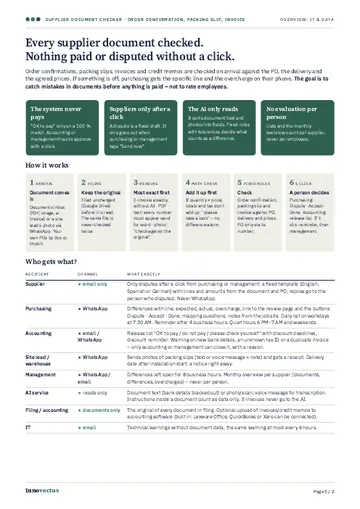
The overview is written for accounting, management and whoever handles data privacy, in plain language. The rest is for your IT team.
- PDFOverview: IT & data2 pages: who gets what, where data is stored, deletion, security, rollout
- JSONWorkflow ready to importfor n8n, self-hosted – no credentials included
- SQLDatabase scriptSupabase (US region) or any PostgreSQL
- PDFSetup guide with checkliststep by step, with a self-check before go-live
Download the package
Get it right away with the code from your LinkedIn message – or have the link sent to your inbox.
Frequently asked questions
Does the system pay invoices or dispute them on its own?
No. An invoice is only marked “ready to pay” on a 100% match – accounting or management still has to approve it with a click, and you pay the way you always do through your accounting software or bank. A complaint is a fixed draft and only goes to the supplier after someone taps “Send now.” If a discrepancy sits untouched, a reminder goes out after 4 business hours and management is looped in after 8 – and even then, nothing is sent.
Our suppliers send messy PDFs and the jobsite sends crumpled delivery notes. Won’t we get false alarms all the time?
That’s exactly what the math check is for: if quantity × price or the total doesn’t add up, you don’t get a discrepancy alert – the document lands on the daily list as “please take a look.” Misread values can be corrected on the check page, and the document is checked again. On top of that come tolerances (price, date), normalized item numbers (12.345-00 = 1234500), learned matches and accepted prices as the new reference. The more suppliers send e-invoices, the less needs to be read at all.
Do we need an integration with our software – or can it be adapted to the way we work?
You don’t need an integration. The easiest way is to BCC your purchase order emails to the documents inbox – the PO is then read just like any other document. If you prefer, you can import purchase orders, price lists and suppliers, e.g. from QuickBooks, your ERP or Excel. We set up tolerances, responsibilities, filing and your accounting software together with you. It also works without a purchasing department: the owner simply gets the alerts directly.
What happens when an invoice shows new bank details?
The invoice is blocked and accounting gets a warning: don’t pay until the new bank details have been confirmed by phone, using the supplier’s known number. Only accounting or management can close the warning, with the reason “Confirmed by phone.” Bank details are only stored as a checksum with the last 4 digits. An unknown VAT ID and duplicate invoices are flagged the same way.
What about data privacy and employee data?
Supplier documents are mostly company data. Personal data includes the team’s phone numbers and email addresses, contact names on documents and the site lead’s photos. Reporting is by supplier only. Check data is deleted after 24 months, notes and edited complaint texts after 90 days; the original stays in your files or accounting system. Tell your team before you launch what the system does, and check whether your state has its own rules for employee data (for example California’s CCPA). Alternatives are available for WhatsApp, the AI and file storage. This is our technical assessment – the legal review is up to your advisors.
What does it cost?
Ongoing fees for AI, WhatsApp, database and server come to roughly €15–60 a month (at about 300 documents). The setup and customization effort depends on how your purchase orders get into the system and which software we connect. You’ll get a fixed quote up front.
Could this work for your business?
A no-obligation intro call – we’ll figure out together whether it’s a good fit.
Book a no-obligation call