14 photos, three voice messages and a “looks good.” On Friday, someone writes the daily log from memory.
The photos sit on five different phones and they’re all called IMG_4711. Somebody listens to the voice messages at night, types them up and files them. And if there’s a dispute later, the one day that matters is missing – even though a latent construction defect claim can come up to 10 years later in California (CCP § 337.15).
Here, your crews send their photos and a short voice message on WhatsApp, in their own language. The photos are filed with clear names in the project folder right away, the daily report with the day’s weather is ready every evening, and the superintendent approves it on their phone.
- Job site
- B-1044 · Maple Street New Build
- Weather
- Rain, 46 to 61 °F, wind up to 25 mph (per Open-Meteo)
- Crew
- 3 crew members · 2 electricians (Schulz Electric)
Delay: scaffolding missing, exterior not started
Try it yourself: one day on the Maple Street job
First you’re Luis, the foreman. He speaks Spanish and sends two photos with a voice message. Then you’re Jennifer Collins, the superintendent, and you approve the daily report in the evening. On the left you can see where the photos end up and how the report comes together. It takes about two minutes.
Who gets what – and who doesn’t
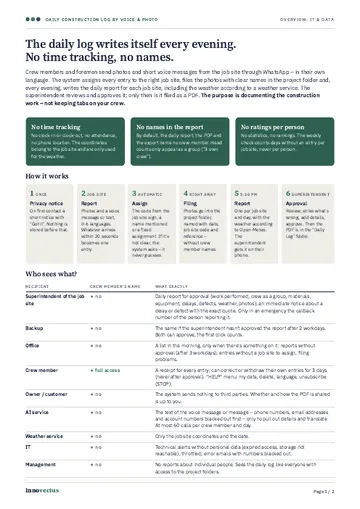
Crew members get a receipt for every entry in their own language. They can correct or withdraw it for three days, as long as the superintendent hasn’t approved the report yet.
The superintendent gets one report per job site every evening and, during the day, only what shouldn’t wait: a delay or a defect, with the exact words that were said.
No employee names in the report and no tracking per person.
| Situation | Crew member | Superintendent | Office |
|---|---|---|---|
| Photos and voice message with code | receipt | in the evening report | nothing |
| Job site not clear | follow-up question with choices | in the evening report | nothing |
| Delay or defect | receipt | heads-up right away, with the exact words | nothing |
| Emergency (“coworker injured”) | told to call 911 right away | right away, with a callback number, even at night | only if there’s no superintendent |
| Report not approved | nothing | reminder after 1 working day, then the backup | on the daily list after 3 working days |
| Entry without a job site | “the office will assign it” | nothing | on the daily list, with a link to assign it |
| Entry after approval | receipt marked “addendum” | addendum with the same number | nothing |
Honest, not overpromised
The system turns photos and voice messages into a clean daily report. That’s all it promises.
A number only goes into the report if it’s actually in the message. The superintendent can add the day’s crew size before approving.
“éramos tres” (there were three of us) → 3 crew membersIt doesn’t estimate crew size and doesn’t add people up.
Temperature, precipitation and wind come from a weather service for the job site’s location.
It isn’t measured on site, and the report says so.
“The scaffolding still hasn’t shown up” reaches the superintendent right away, with the original sentence and the entry number.
It isn’t a formal delay notice and it isn’t legal advice. Whether a notice is needed is the superintendent’s call.
The AI pulls out the details and translates. On the review page, the superintendent sees the original next to the translation and approves exactly what they saw.
An approved report is never changed. Anything that comes in later becomes an addendum.
What the system doesn’t do
No time tracking
No clock-in or clock-out, no attendance, no phone location. It’s about the job site, not the person.
No names in the report
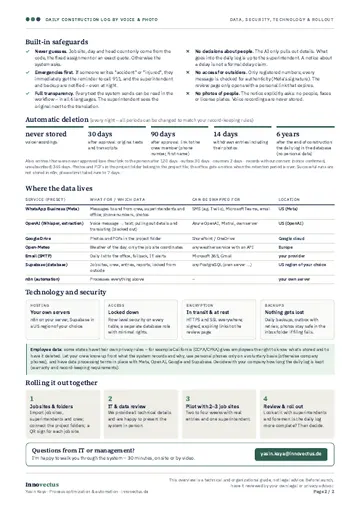
The report, PDF and export don’t name anyone. The link to the crew member is deleted 90 days after approval.
No tracking per person
No statistics, no rankings. The weekly check counts days without an entry per job site.
It never guesses the job site
If it isn’t clear where a photo belongs, it asks. Without an answer, the office assigns it.
Nothing goes to owners
The system only messages your own people. Whether the PDF is shared is up to you.
No audio files
Voice messages are transcribed and not stored. The transcript is deleted 30 days after approval.
What you need
| Component | Default setup | Alternatives / your systems |
|---|---|---|
| Database | Required. Supabase (US region), free up to mid-size | any PostgreSQL: your own server, AWS, Azure |
| Messages to crews and superintendents | WhatsApp Business (Cloud API) – set up in 6 languages, extendable at will | text messages, Microsoft Teams, email |
| Voice to text, pulling out details, translating | OpenAI (Whisper and GPT) – gets the text without phone numbers or email addresses | Azure OpenAI or another compatible service |
| Photos and PDF in the project folder | Google Drive, folder “Projects/Year/Client/Project” | SharePoint / OneDrive |
| Weather | Open-Meteo (commercial plan) | any weather service with daily values |
| any mailbox via SMTP, e.g. Google Workspace | Microsoft 365 / Outlook | |
| Job sites and crew | Import as CSV or JSON | Procore, Buildertrend, your HR system |
| Automation | n8n, self-hosted | – |
Running costs (ballpark for about 20 crew members and 5 job sites): roughly $5–25 a month for voice-to-text and AI, plus a few cents per WhatsApp template message to the superintendent and the weather service plan. The database is free at this size; you usually already have a server and a Google account.
Prefer text messages or email instead of WhatsApp? During setup we can switch the messages to text or email. Follow-up questions then come as numbered choices (“1 = Maple Street, 2 = Lincoln School”), and photos come in by MMS or email.
Setup: We set the system up with you, import your job sites and crews, connect your project folders, and agree on deadlines and wording with your superintendents.
Documents for IT, management & superintendents
Everything that needs to be reviewed before you start – in one package, for everyone who has a say.
What’s inside
The overview is written for management and your superintendents, in plain language. The rest is for your IT team.
- PDFOverview: IT & data2 pages: who sees what, where data is stored, deletion, security, rollout
- JSONWorkflow ready to importfor n8n, self-hosted – no credentials included
- SQLDatabase scriptSupabase (US region) or any PostgreSQL
- PDFSetup guide with checkliststep by step, with a self-check before go-live
Download the package
Get it right away with the code from your LinkedIn message – or have the link sent to your inbox.
Frequently asked questions
Does my crew need to install an app?
No. They message your company’s WhatsApp number, just like they already send photos today. The first time, they get a short privacy notice with a “Got it” button; after that, photos and a short voice message are all it takes. With the QR code on the site fence, the job site code is already in their first message.
How does the system know which job site it is?
From the code on the posted sign, from a job site or street name mentioned in the message, or because the crew member is only assigned to one job site. If someone sends another photo shortly afterwards on the same day, the system uses the same job site and says so. If it isn’t clear, it asks – it never guesses.
Some of my crew barely speak English. Will this work?
Yes. It comes set up for English, Spanish, German, Polish, Romanian and Turkish, and more languages can be added. Everyone speaks in their own language and gets the receipt in their own language. The report is in English, and on the review page the superintendent sees the original next to the translation.
Isn’t this a way to monitor my crews?
No. There’s no time tracking, no attendance, no location, no names in the report and no tracking per person. The link to the crew member is deleted 90 days after approval, and everyone can view and delete their own data in the menu. If you’re unsure about specific rules in your state, please check with your own legal counsel.
Where are the photos stored – with us or in some third-party app?
With you: in your Google Drive or SharePoint, in the project’s folder, sorted by year, client and project. If a project folder already exists, the system uses it. The PDF of the daily report goes there too, in the “Daily Log” subfolder.
What does it cost?
Ongoing, just the service fees – you’ll find the ballpark above under “What you need.” The setup effort mostly depends on how your project folders are organized and where your job sites and crew lists come from. You’ll get a fixed quote up front.
Something like this for your company?
Let’s see together whether it’s a good fit.
Book a no-obligation call