Your crew knows about the problem. Your fleet manager doesn’t.
A brake light is out, a tire keeps losing air, the cord on the rotary hammer is crushed – your crew sees it first. But it often gets reported too late: the note is sitting in the glove box, and the call went to voicemail.
With this system, your crew member simply scans the QR code on the vehicle or tool. Then they report the problem on WhatsApp – with a photo or a voice message, in their own language. The report goes straight to the right person.
If the problem is a safety issue – brakes, lights or tires, for example – the vehicle is taken out of service right away. The crew member gets the message “Do not drive,” and dispatch stops scheduling the vehicle. Only once it’s been repaired does the fleet manager put it back in service.
of vans up to 3.5 tonnes (7,700 lb) had major or dangerous defects at Germany’s mandatory vehicle inspection – most often in the lighting. Many of them could have been reported and fixed beforehand. TÜV Association
Try it yourself
Fleet board on the left, phone on the right. Pick a situation and click through – each takes about a minute.
What a ticket looks like
Your fleet manager gets everything at a glance: which vehicle, what’s broken, a photo and whether it’s still safe to drive. All that’s left is to tap a button.
Vehicles go to the fleet manager, tools and equipment go to the shop. If someone reports the same problem again, the photo is added to the open ticket. No duplicate tickets.
Your fleet manager can see every open defect on an overview page at any time – just text “LIST” on WhatsApp and open the link.
| Vehicle | V-04 · Cargo van (JKT 2041) |
| Location | Columbus |
| Type of defect | Lights / turn signals |
| Description | Left rear brake light out |
| Still safe to use? | not answered |
| Reported by | Jake |
| Warranty | expired (03/31/2026) |
Whoever taps first takes the ticket.
What your business gets out of it
Everyone knows what’s down
When a van goes down, dispatch knows right away. Anyone who scans a vehicle that’s out of service gets a “do not drive” warning. Nobody gets scheduled with a broken truck.
Fixed faster
The report goes straight to the fleet manager or the shop, photo included. If nobody responds, it goes to their backup. And if it’s still under warranty, a draft claim is already waiting in the office.
Fewer inspection headaches
Problems that get reported and fixed along the way won’t turn up at the next DOT or state inspection. That often saves you a re-inspection – with a second appointment and extra fees.
Smoother lease returns
Dents and damage are reported with a date and photo when they happen – not when the inspector finds them at turn-in. That leaves time to get most of it repaired.
What the system doesn’t do
No blame game
Nobody is ever asked who caused the damage, so people are happy to report early. After an accident, the crew member only gets a reminder to fill out the accident report.
The AI doesn’t decide what’s unsafe
Whether a problem is a safety issue is decided by a fixed rule you can read yourself. The AI only picks out what was said. It can never downgrade a warning.
No tracking of individuals
No ranking of who reports how much. No GPS tracking, no driving data. The overview and export contain no names – everything is counted per vehicle and tool.
Only a person can clear it
Only the person in charge can put equipment back in service – with “Fixed – OK to use.” If another safety issue is still open on the vehicle, it stays out of service.
What you need
| Component | Default setup | Privacy-friendly / your systems |
|---|---|---|
| Database | Yes, required. Supabase (US region of your choice), free up to mid-size | any PostgreSQL: your own server, IONOS, STACKIT, Azure |
| Messaging | WhatsApp Business (Meta’s official API) | SMS, Microsoft Teams, email |
| Speech recognition & extraction | OpenAI (USA) | Azure OpenAI (your own region), Mistral, your own server |
| Photo storage | Google Drive | SharePoint / OneDrive |
| Your existing mailbox | Microsoft 365, Gmail | |
| Overview & export | Overview page of all open defects (protected link), monthly CSV export | Google Sheets or Excel via the CSV file |
| Vehicles, tools & QR stickers | A list from Excel (CSV): vehicles and tools, who’s responsible, employees. The system creates the sheet of QR stickers itself. | Export from your HR or fleet management software |
| Automation | n8n, self-hosted on your own server | n8n, self-hosted on your own servers |
Running costs (ballpark for about 50 employees and 60 reports a month): roughly $15–55 a month for WhatsApp, speech recognition, database and server. Please check the providers’ current pricing.
Prefer text messages or email over WhatsApp? WhatsApp is the default, but we can swap it for SMS (e.g. Twilio) or email during setup – employees then reply with a number or a word instead of tapping buttons; the setup guide explains what changes.
Setup: We set the system up with you – importing your vehicles and tools, assigning who’s responsible, printing the QR stickers. Meta reviews the WhatsApp message templates before launch.
Documents for IT, management & fleet
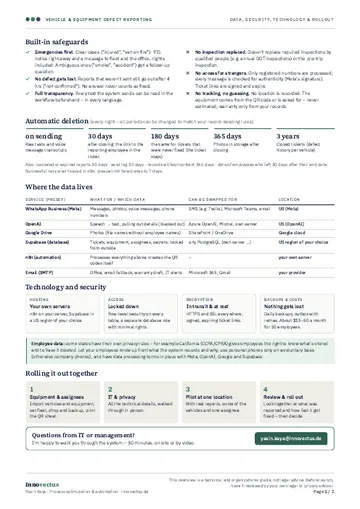
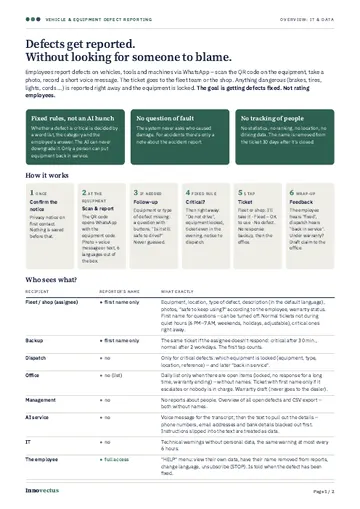
Everything that needs to be reviewed before you start – in one package, for everyone who has a say.
What’s inside
The overview is written for management and whoever handles privacy, in plain language. The rest is for your IT team.
- PDFOverview: IT & data2 pages: who sees what, where data is stored, deletion, security, rollout
- JSONWorkflow ready to importfor n8n, self-hosted – no credentials included
- SQLDatabase scriptSupabase (US region) or any PostgreSQL
- PDFSetup guide with checkliststep by step, with a self-check before go-live
Download the package
Get it right away with the code from your LinkedIn message – or have the link sent to your inbox.
Frequently asked questions
Does my crew need an app?
No. It runs on regular WhatsApp. The office adds each cell number once. The crew member scans a QR code or texts “Hi” and confirms the privacy notice once. Nothing is stored before that.
Which languages does it support?
English, Spanish, German, Polish, Romanian and Turkish are built in. Each language is its own text file, and more can be added. Your fleet manager and shop get the ticket in their own language. Before launch, the translations and the list of safety words should be checked once by native speakers.
Who decides whether a problem is a safety issue?
A fixed rule that you can read and adjust. Problems with brakes, tires, lights, steering, cords or batteries count as safety issues. The same goes if a word from the list comes up (there’s a list for each language) or if the crew member answers “No” or “Not sure” to “Is it still safe to drive?” The AI may add a warning if it can quote the exact words. It can never downgrade one. Once something is flagged as unsafe, it stays out of service until a person clears it.
What happens if someone scans a vehicle that’s out of service?
They immediately get the warning: “Out of service since … – do not drive or use it until it’s been cleared.” They can still send a new report. If someone reports the same problem again, it’s added to the open ticket.
What if nobody responds?
Safety issues go to the backup after 30 minutes and to the office after 2 hours – evenings included. For regular problems, there’s a reminder after one business day, it goes to the backup after two, and it lands on the office’s daily list after three. In the evening, on weekends and on holidays, regular problems wait until the next workday starts. Silence never counts as “done.”
Does this replace DOT inspections or the driver’s pre-trip inspection?
No. Required inspections and pre-trip checks stay in place. The system makes sure problems that come up in between get reported quickly and are on record for every vehicle.
What about data privacy and employee concerns?
The reporter’s first name only goes to the person in charge. That can be turned off, and the name is removed 30 days after the ticket is closed. Phone numbers and account details are redacted before the AI reads anything. Every message the system sends can be read in advance. WhatsApp, OpenAI and Google are US providers – alternatives are available. Before launch, we recommend a short agreement with your employee representatives, if you have them, and a review of your data processing agreements. This is our technical assessment – the legal review is up to your advisors.
What does it cost?
Ongoing fees for WhatsApp, speech recognition, database and server run roughly $15–55 a month. The setup effort depends on how many vehicles, tools and locations you have. You get a fixed quote up front.