Scratches in the hardwood, a crack above the door – already there before you started. But who can still show that three weeks from now?
At the final walkthrough comes the line: “That wasn’t there before.” The photos are scattered across personal phones, with no job number and no confirmation – and it’s one person’s word against another’s. Customers know the problem too: in a representative survey in Austria (1,000 respondents, January 2026), 9% named damage to existing furnishings or furniture as an annoyance during repair and renovation work. ImmoScout24.at
Here, the technician sends photos and a short voice message on WhatsApp before work starts. These become a record that the customer confirms on the spot, on their phone – or later through their own link. If they see something differently, it comes up before anyone picks up a tool.
SHA-256 3c9f2a71e4b0…8e15d0a4Try it out: a walkthrough of the home
You’re the technician, walking through the home before work starts. Tap a room on the floor plan – the photo and voice message go out on WhatsApp. Then the customer confirms on your phone, and the PDF takes shape below. About two minutes.
The record as a PDF
Record_VS-2026-0147_A-1043.pdfA4 · English · 3 pagescreated once the customer repliesStraight talk, not big promises
The record is a piece of documentation. How much it counts in a dispute depends on the individual case and is not up to the company – which is why the PDF says exactly what it is and what it isn’t.
What the technician said or wrote, neatly written up in plain English – every note backed by a word-for-word quote from their message.
No AI looks at the photos. Damage is not detected or assessed automatically.
When the photo arrived on WhatsApp.
sent on Oct 12, 2026, 7:42 AMNot the time the photo was taken – WhatsApp strips the camera data. The PDF says so, too.
A kind of fingerprint of the photo file, calculated when it comes in. If the photo is changed later, even slightly, the fingerprint no longer matches.
SHA-256: 3c9f2a71e4b0d6c5…8e15d0a4It only shows whether the file has been changed since – nothing more.
With name, on-screen signature, time and a shortened IP address – on the technician’s phone or through their own link.
Not a qualified electronic signature. It’s an on-screen signature, like the one you give the delivery driver.
If there’s no reply to the link after 72 hours, the record is closed exactly like that.
No agreement that was never given.
What the site manager and the office see
The site manager gets an alert right away whenever something needs sorting out before work starts: when the customer sees something differently – with their comment, phone number and a link to the record – or when the technician mentions a warning word such as mold, asbestos or exposed wiring.
That way a disputed point gets settled while everyone is still on site – not when the final invoice goes out. And if someone does ask later, the PDF is sitting in your document storage instead of someone hunting for photos on personal phones.
The office gets a daily list at 8 a.m. on business days – only when something is waiting. Nobody tracks who documents how much.
These records and orders need a look (since the last list):
| Record | Order | What needs doing? |
|---|---|---|
| VS-2026-0147 | A-1043412 Maple Ave, Springfield | Customer sees something differently view |
| VS-2026-0144 | A-103827 Elm St, Fairview | Customer hasn’t responded view |
| VS-2026-0146 | no order“Brooks, Depot Street” | no order – please assign it via the link view / assign |
| – | A-10415 Harbor Ln, Riverton | started, but no record |
The list shows orders only, no technicians.
What the system doesn’t do
It never guesses the order
Only an order number from the message counts. Otherwise it suggests today’s only order or asks with a pick list. Unknown numbers are not accepted.
It never names the technician
Their name appears neither in the PDF nor on the customer’s page. If you want it differently, you switch it on in the settings.
No unsolicited messages
The link goes by email to the address on the order, and by WhatsApp only with consent. At most: the link, one reminder and the PDF.
Confirmed records stay put
New photos sent after confirmation become a separate record, “Addendum to VS-…”. The confirmed one stays exactly as it is.
It doesn’t settle disputes
If the customer sees something differently, the system passes it on. The site manager and the customer have to sort it out – on site or by phone.
No photos in the database
Photos live only in your document storage. The database holds just an ID, a timestamp and the checksum.
What you need
| Component | Default setup | Privacy-friendly / your systems |
|---|---|---|
| Database | Required. Supabase (EU, Frankfurt), free up to mid-size | any PostgreSQL: your own server, IONOS, STACKIT, Azure |
| Messages to technicians & site manager | WhatsApp Business (Cloud API) – set up for technicians in 6 languages, extendable at will | SMS, Microsoft Teams, email |
| Link & PDF to customers | Email (SMTP, e.g. your own mailbox at IONOS); WhatsApp only with consent | Microsoft 365 / Outlook, Gmail |
| Document storage (photos & PDF) | Google Drive | SharePoint / OneDrive |
| AI (transcribing voice messages, writing up the statements) | OpenAI (US) – receives text only, never photos | EU: Azure OpenAI, Mistral, IONOS AI Model Hub, STACKIT – or no AI at all, in which case the PDF carries the exact wording |
| Orders & customers | Import via CSV or JSON, e.g. from Jobber | Buildertrend, Excel |
| generated within the workflow itself – no extra service | your own layout: Gotenberg, PDFMonkey | |
| Automation | n8n, self-hosted | – |
Running costs (ballpark for about 15 technicians and 150 records a month): roughly €15–50 a month for WhatsApp, AI, database and server – under €0.50 per record. You most likely already have Google Drive or Microsoft 365.
Text messages or email instead of WhatsApp: WhatsApp is the default, but your team can get text messages (SMS, for example through Twilio) or email instead – we handle the swap during setup.
Setup: We set the system up with you, import your orders, and agree on the company header, deadlines and warning words with your site manager and office.
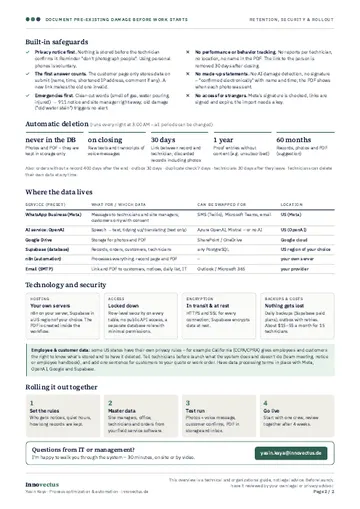
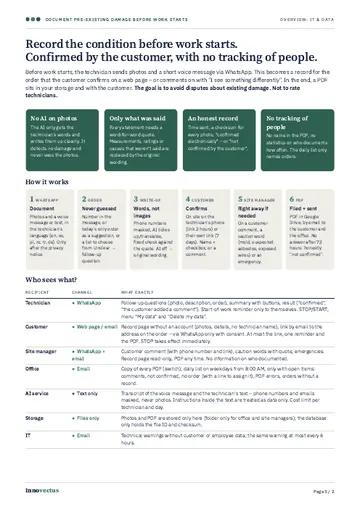
Documents for IT, management & site managers
Everything that needs to be reviewed before you start – in one package, for everyone who has a say.
What’s inside
The overview is written for management and site managers, in plain language. The rest is for your IT team.
- PDFOverview: IT & data2 pages: who sees what, where data is stored, deletion, security, rollout
- JSONWorkflow ready to importfor n8n, self-hosted – no credentials included
- SQLDatabase scriptSupabase (US region) or any PostgreSQL
- PDFSetup guide with checkliststep by step, with a self-check before go-live
Download the package
Get it right away with the code from your LinkedIn message – or have the link sent to your inbox.
Frequently asked questions
Do my technicians have to learn a new app?
No. They use WhatsApp the way they always do: send photos, say briefly what stands out – a voice message is enough. They get a summary back with three options to choose from. If they like, they also get a reminder at the scheduled start – “Please record the condition first” – and only the technician sees it; nobody else finds out.
What if the customer isn’t there when work starts?
Then the technician taps “Link to customer.” The customer gets the link by email and has seven days to confirm; if there’s no response, a reminder goes out after 24 hours – during the day, never on Sundays. They get the PDF either way, along with a request to get in touch within 14 days if anything is off.
Our crew doesn’t speak much English – does this still work?
Yes. German, English, Polish, Romanian, Turkish and Spanish are set up, and more languages can be added. The technician speaks in their own language and sees the summary in that language, plus the version the customer will see. The PDF also carries their exact words. If you don’t trust the translation, switch the AI off – then the exact wording goes into the record unchanged.
Can it be adapted to our business?
Yes – no programming needed: the company header on the PDF, deadlines, warning words, the pattern of your job numbers, languages, AI on or off. Orders are imported via CSV or JSON, for example from Jobber, Buildertrend or Excel. For small businesses there’s a lean setting: the owner is site manager and office in one, and the customer only confirms on site.
What about privacy and employee data?
Technicians get a privacy notice on first contact – nothing is stored before that. No location data; 30 days after completion, the link to the technician is deleted from the record as well. From the customer we store the name, time, a shortened IP address and, if applicable, their comment. Retention periods are enforced every night; we suggest 60 months for records, photos and PDF. Tell your technicians how it works before you launch, and check whether your state has its own rules for employee and customer data (for example California’s CCPA). All the technical details are in the overview in the download package; the legal review is up to your own advisors.
What does it cost?
Ongoing, it’s just the fees for the services involved – you’ll find the ballpark figure in the “What you need” box above. Setup and customization effort depends on where your orders come from and what needs adapting. You get a fixed quote up front.
Could this work for your business?
We’ll figure out together whether it’s a good fit.
Book a no-obligation call