The extra work gets done. It rarely gets billed.
“Could you adjust the old front door while you’re at it?” Your team says yes and takes care of it. Then it’s “I’ll tell the office” – and it falls through the cracks. Even a handwritten note usually stays in the van. The office never hears about it, so there’s nothing to bill. With this system, the employee reports the extra work on WhatsApp in a minute, the site manager approves it with one click, and accounting gets a ready-to-go invoice draft.
Try it yourself
Pick a situation and click through it – as the employee, the customer, the site manager and accounting. It takes about three minutes.
The result: a ready-to-go invoice draft
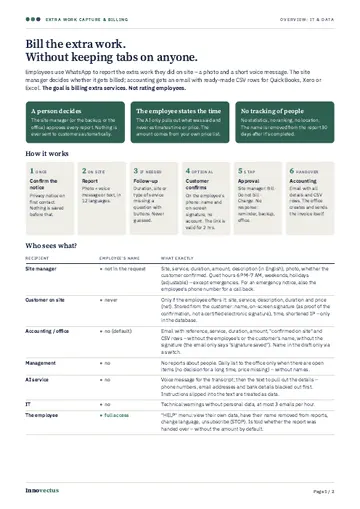
Employees report in their own language what they did and how long it took. If something’s missing, the system asks a follow-up question with options to choose from – it never guesses.
Your price table works out the amount, using your billing increments and any special rates per site. The site manager decides on WhatsApp with one click. If they don’t respond, they get a reminder, and after that their backup is asked.
Approved extra work lands as a draft in Lexware Office or as an email to your office. Nothing goes out unless your office sends it.
To: The Berger family · Date of service: Oct 2, 2026
“We are billing you for the following additional services performed on site:”
| Installation service – Single-family home, Ahornweg 3 Adjusted old front door (not in original order) Ref. MA-2026-0147 dated Oct 2, 2026 · 45 min Confirmed by customer on site on Oct 2, 2026 | 1 flat rate €43.50 |
| Subtotal | €43.50 |
| VAT 19% | €8.27 |
| Total | €51.77 |
Calculated: 45 min × €58/hr from the price table. The employee’s name isn’t on the draft; the photo is saved in your files.
What could this mean for your business?
Four sliders are all it takes to get a first number. It only uses the values you enter.
How the system works
The goal is to bill extra services properly – not to evaluate employees. These rules are built in and documented for your IT team and whoever handles privacy. Approvals follow your rules: if you like, certain people, such as a supervisor or foreman, can approve extra work right on site.
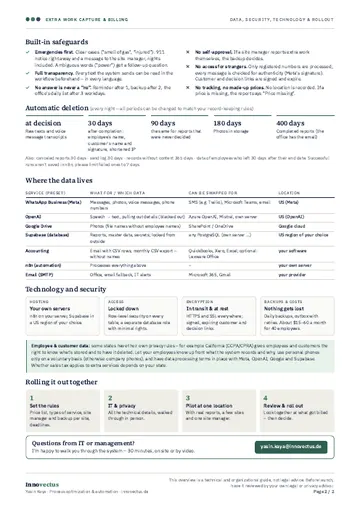
- ⏱️No estimated timesThe employee always says how long it took. The AI only picks out what was said, and your price table calculates the amount.
- 📭Nothing goes to the customerAll it creates is a draft, which your office reviews and sends itself. If the site manager doesn’t respond, the report isn’t rejected – it stays open until someone decides.
- 📊No per-person reportingThere are no stats or rankings of who reports how much, and no location tracking. 30 days after completion, the employee’s name is removed from the report.
- 🕶️Names only where they belongAs usual, the invoice shows your client – but not the employee’s name. Whoever confirmed on site only shows up as “Confirmed by customer on site on [date].”
What you need
The default setup is whatever gets you up and running fast. Every component can be swapped out – for providers your privacy rules call for, or for the software you already use.
| Component | Default setup | Privacy-friendly / your systems |
|---|---|---|
| Database | Yes, required. Supabase (US region of your choice), free up to mid-size | any PostgreSQL: your own server, IONOS, STACKIT, Azure |
| Messaging | WhatsApp Business (Meta’s official API) | SMS, Microsoft Teams, email |
| Speech recognition & extraction | OpenAI (US) | Azure OpenAI (your own region), Mistral, your own server |
| Handover to accounting | Email to the office with ready-made CSV rows, plus a monthly CSV export | QuickBooks, Xero, Excel – or a direct connection to your own software |
| Photo storage | Google Drive | SharePoint / OneDrive |
| Your existing mailbox (SMTP) | Microsoft 365, Gmail | |
| Master data | Import as an Excel/CSV list: sites, prices, employees, site managers | Export from your HR or accounting software |
| Automation platform | n8n, self-hosted on your own server | n8n, self-hosted on your own servers |
Running costs: roughly $15–60 a month (ballpark for 40 employees and 100 reports), so under $1 per report. That covers WhatsApp messages to site managers, speech recognition, database and server. Please check the providers’ current pricing.
Prefer text messages or email over WhatsApp? WhatsApp is the default, but we can swap it for SMS (e.g. Twilio) or email during setup – employees and site managers then reply with a number or a word instead of tapping buttons; the setup guide explains what changes.
Setup: Your IT team gets a step-by-step guide with a built-in self-check. Allow 1–2 days for Meta to review the WhatsApp templates.
Documents for IT & management
Everything that needs to be reviewed before you start – in one package, for everyone who has a say.
What’s inside
The overview is written for management and whoever handles privacy, in plain language. The rest is for your IT team.
- PDFOverview: IT & data2 pages: who sees what, where data is stored, deletion, security, rollout
- JSONWorkflow ready to importfor n8n, self-hosted – no credentials included
- SQLDatabase scriptSupabase (US region) or any PostgreSQL
- PDFSetup guide with checkliststep by step, with a self-check before go-live
Download the package
Get it right away with the code from your LinkedIn message – or have the link sent to your inbox.
Frequently asked questions
Do employees need an app?
No. It runs on regular WhatsApp. The office adds the employee’s number once, then the employee sends “Hello” (or scans the notice posted at the site) and confirms the privacy notice. Nothing is stored or analyzed before that.
Which languages does it support?
Any language you need. Twelve come preset: German, Polish, Romanian, Turkish, Russian, Ukrainian, Croatian, Bulgarian, Arabic, Spanish, Italian and English – and you can add more anytime. The site manager always reads the summary in German. We recommend having native speakers proofread the translations once before you go live.
What if the site manager doesn’t respond?
After one business day, they get a reminder. After two, the report goes to their backup. After three, it shows up on the office’s daily list. In the evening, on weekends and on public holidays, the request waits until the workday starts. No response never counts as “rejected.”
What about data privacy and employee concerns?
The system is built for it: no per-person reporting, names removed 30 days after completion, photos deleted after 180 days, phone numbers and bank details redacted before anything reaches the AI, and every text available to read in advance. Alternatives to WhatsApp, OpenAI and Google are available. Before you start, let your employees know what the system records and why, and review your data processing agreements – some states, such as California (CCPA), have their own privacy rules. This is our technical assessment – the legal review is up to your advisors.
Will it work with my invoicing software?
Yes, with whatever software you use. Lexware Office is set up by default. Without an integration, every approved report goes to the office as an email with all the details, plus a monthly CSV export for sevDesk, DATEV or Excel. We connect your own software during setup.
How does the customer confirm on site?
On the employee’s phone: the customer sees the service, duration and price, enters their name and signs with a finger – no account needed. Then they tap “Confirm” or “Not requested.” If they decline, the site manager sees the note and decides. The signature serves as proof and is deleted 30 days after completion. On-site confirmation is optional and can be turned off completely.
What does it cost?
Ongoing fees for WhatsApp, speech recognition and database come to roughly €15–55 a month. The setup and customization effort depends on how many sites and prices you have and which software we connect. You’ll get a fixed quote up front.
More live demos
A new real-world workflow is added every Wednesday and Friday.
Could this work for your business?
A no-obligation intro call – we’ll figure out together whether it’s a good fit.
Request a free process analysis