Appointment at 1 PM. The tech is running 45 minutes late. The customer finds out when they call you.
The job before ran long, or traffic is backed up. Your technician has known for half an hour – but calling from behind the wheel isn’t an option: 33 states and D.C. ban handheld phone use for all drivers (GHSA). So the customer waits, calls the office, and dispatch spends the afternoon chasing updates.
Here, the technician taps one button in WhatsApp while parked. The next customer on the schedule immediately gets a new arrival window – by WhatsApp, text message or email, in their own language. The office only hears about it when it needs to step in.
Try it yourself: a day with five jobs
You’re Mike, the technician. It’s 12:35 PM, you’re stuck in traffic, and your next job is at 1 PM. While parked, tap one of the buttons – then reply as the customer. At the top, pick how the customer can be reached. Takes about two minutes.
Who hears what – and who doesn’t
The customer gets an arrival window instead of a number of minutes, rounded to the nearest quarter hour. If they’ve just been notified and the technician corrects the estimate, they don’t get a second message – the correction goes to the office.
Dispatch only gets the cases where it actually has to do something. Every alert comes with the reason and the customer’s phone number, so it’s handled with one call.
There’s no list of who’s late how often.
| Situation | Customer | Technician | Office |
|---|---|---|---|
| 15 or 30 min late | new arrival window | confirmation | nothing (except for the last job of the day) |
| 45 min late or more | new arrival window | confirmation | alert: “check whether to reschedule” |
| Next job is at risk | only the next customer | confirmation | alert naming the job at risk |
| Customer only has a landline | no message | “landline only” | “please call” with the number |
| Customer cancels | confirmation | finds out right away | urgent alert to reschedule |
| Message isn’t delivered | text or email instead | is told honestly | “please call” if no text is possible |
| Technician corrects the estimate | no second message | “updated” | correction with the new window |
Honest, not oversold
The system turns one tap into a clear message for the customer. That’s all it promises.
Scheduled start plus the reported minutes, rounded to a quarter hour, 30 minutes wide – and never in the past.
Job at 1:00 PM · +30 min → today between 1:15 PM and 1:45 PMIt doesn’t calculate drive time or know about traffic. The minutes come from the technician.
WhatsApp and the text message provider report back whether the message was delivered. If not, it goes out by text or email instead, and the technician is told.
It doesn’t claim the customer has read the message.
“30”, “half an hour late” or said out loud – in 13 languages. From a voice message, only the number of minutes is used.
The transcript isn’t stored, and nobody is ever asked for a reason.
Works for me, call back or cancel – by button or text message. Cancellations and callback requests go straight to dispatch, cancellations to the technician too.
It doesn’t reschedule on its own or move jobs in your software.
What the system doesn’t do
It never asks why
Only minutes are reported. If someone adds a reason, it isn’t stored.
No GPS tracking
No location, no driving data. The technician reports it himself – with one tap, while parked.
No scorecards
No stats, no rankings, no reports per technician. Delay reports are deleted after 14 days.
No WhatsApp without consent
Customers who haven’t opted in get a text or an email. Replying STOP ends it immediately.
No message storms
At most one customer message every 15 minutes. A correction updates the schedule – the customer doesn’t get a second message.
Nothing while driving
Every message says “only while parked”. After hours, the system asks first before any customer hears anything.
What you need
| Component | Default setup | Alternatives / your systems |
|---|---|---|
| Database | Required. Supabase (US region), free up to mid-size | any PostgreSQL: your own server, AWS, Azure |
| Messages to technicians, office & customers | WhatsApp Business (Cloud API) – set up in 13 languages, extendable at will; customers only with consent | text messages, Microsoft Teams, email |
| Text messages to customers without WhatsApp | seven.io – customers can reply by text | Twilio or another text message provider |
| Microsoft 365 / Outlook | any mailbox via SMTP, e.g. Google Workspace | |
| Voice message → minutes | OpenAI Whisper – receives only the voice message | Azure OpenAI or another compatible service – or no voice messages at all |
| Schedule | Import from your field service software, Outlook calendar or a spreadsheet (CSV or JSON) | Jobber, ServiceTitan, Housecall Pro – direct connection on request |
| Automation | n8n, self-hosted | – |
Running costs (ballpark for about 30 technicians and 150 delay reports a month): roughly $60–130 a month for text messages, WhatsApp, voice-to-text, database and server – around 15 cents per case. Text message prices depend on your provider and US carrier fees.
Prefer text messages or email instead of WhatsApp? Customers already get a text message whenever they haven’t opted in to WhatsApp. If your technicians don’t use WhatsApp either, they can report through the web button (for example from your field service app), or we switch their messages to text or email during setup.
Setup: We set the system up with you, connect your schedule, and agree on thresholds, working hours and wording with dispatch.
Documents for IT, management & dispatch
Everything that needs to be reviewed before you start – in one package, for everyone who has a say.
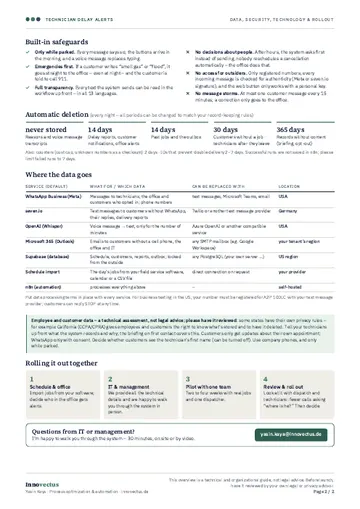
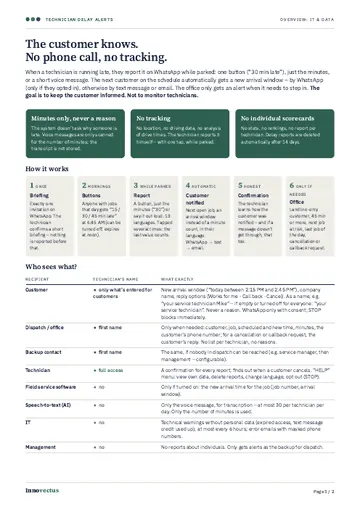
What’s inside
The overview is written for management and dispatch, in plain language. The rest is for your IT team.
- PDFOverview: IT & data2 pages: who sees what, where data is stored, deletion, security, rollout
- JSONWorkflow ready to importfor n8n, self-hosted – no credentials included
- SQLDatabase scriptSupabase (US region) or any PostgreSQL
- PDFSetup guide with checkliststep by step, with a self-check before go-live
Download the package
Get it right away with the code from your LinkedIn message – or have the link sent to your inbox.
Frequently asked questions
Does my technician have to look at the phone while driving?
No. Reports only happen while parked, and every message says so. Anyone with jobs that day gets the three buttons in the morning; after that, one tap on “30 min late” or a short voice message is all it takes. After hours, the system asks first before any customer gets a message.
How does the system know who the next customer is?
From the schedule: your field service software, Outlook calendar or a spreadsheet sends the day’s jobs to an import address. If the technician is still on one job and the next one is already coming up, the system asks with two buttons which customer is meant – it doesn’t guess.
What about customers without WhatsApp or without a cell phone?
Only customers who agreed get WhatsApp. Everyone else with a cell number gets a text message and can reply by text (“Cancel”, “Call me”). Without a cell phone, an email goes out, and for landline-only customers the office immediately gets “please call” with the number.
Isn’t this tracking my techs?
There’s no GPS, no reasons, no stats and no ranking per technician; delay reports are deleted after 14 days. Technicians confirm a short briefing on first contact, can see their data anytime and can opt out with STOP. Tell your team how it works before you launch, and check whether your state has its own rules for employee and customer data (for example California’s CCPA). All the technical details are in the overview in the download package; the legal review is up to your own advisors.
Can it be adapted to our business?
Yes – no programming needed: the minutes on the buttons, working hours, when the office gets involved, whether the customer sees the technician’s first name, all wording in 13 languages, and who in dispatch gets the alerts (by email, WhatsApp or Teams). On request, the new arrival time also goes back into your software.
What does it cost?
Ongoing, only the fees for the services – you’ll find the ballpark above under “What you need”. The setup effort mainly depends on where your schedule comes from. You’ll get a fixed quote up front.
Could this work for your business?
We’ll figure out together whether it’s a good fit.
Book a no-obligation call