Find out what’s bugging your customer – before the invoice is due
“There was still dust all over the stairs.” Hardly anyone says that to the crew’s face. They say it later – by holding back payment or leaving a one-star review.
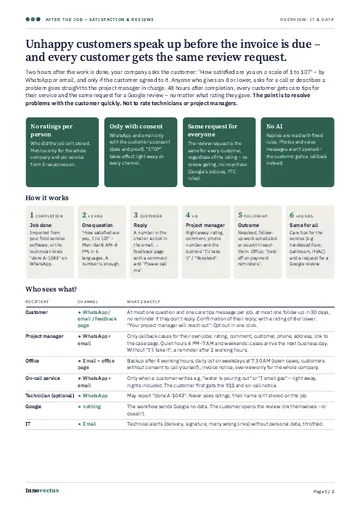
That’s why every customer gets a single question two hours after the job: How happy are you, on a scale of 1 to 10? Anyone who answers 8 or lower goes straight to their project manager, who picks up the phone before things turn sour.
48 hours later, every customer gets care tips for their job – and the same request for an honest review.
“How happy are you with our work, on a scale of 1 to 10?”
Care tips for their job and a request for a Google review. Even for the customer who gave a 3 – and for the one who never replied.
Only asking happy customers for reviews? Google doesn’t allow it. Businesses aren’t allowed to ask only for positive reviews or to discourage negative ones. That’s why this system deliberately has no “only ask happy customers” switch. Instead, a low score lands with the project manager first. Google policy
Try it yourself
Customers on the left, project manager in the middle, office on the right.Three customers, three finished jobs. Switch between customer, project manager and office.
What the project manager gets
No forms, no leaderboard – just one case with everything needed for the call.
- Call with one tap. The phone number is right on the case page – tap it and the phone dials.
- Sort it out first, chase payment later. The office automatically gets a heads-up to hold off on payment reminders until the case is resolved.
- One person owns it. Whoever taps “I’ll take it” first owns the case. If a colleague taps it later, she sees who already has it. If nobody takes it, a reminder goes out after two working hours, and after four the office backup steps in.
- Outcomes, not sticky notes. The result gets logged: resolved, follow-up booked, couldn’t reach or no action needed. “Couldn’t reach” triggers another reminder the next working day.
- After hours stay after hours. Between 6 PM and 7 AM and on weekends, callback cases wait until the next working day. Emergencies always come through right away.
- No stats per employee. Cases aren’t linked to your staff. Which tech was on site – and how many cases each tech has – is never stored.
What the system won’t do
How it protects your customers
- Opt-in only. WhatsApp messages and emails only go out with consent. “STOP”, “No more messages” or one click on “Unsubscribe” takes effect immediately on every channel, and anything still queued is dropped.
- One question, no nagging. Each job gets one question and one care-tips message at most, and each customer one follow-up in 30 days. No reply means no second ask.
- Emergencies come first. If a customer writes “water pouring out” or “smell of gas”, they immediately get a reminder to call 911 plus your emergency number – and your on-call tech is alerted, even at night. Unclear words like “dripping” get a quick “Is this an emergency?”
- No access for outsiders. The customer’s feedback page only opens through a private link; case pages are signed and expire. No ad or analytics trackers, and none of the pages show up in search engines.
How it protects your team
- Company-wide numbers only. Satisfaction is only shown for the whole business and per type of job, and only once there are 5 responses – never per project manager or crew.
- No phantom scores. Nothing is saved until the customer hits submit. Email virus scanners that open links ahead of time don’t create a score. The last answer within 14 days is the one that counts.
- No AI. Replies are read by fixed rules. The system doesn’t open photos or voice messages – the customer gets a call back instead.
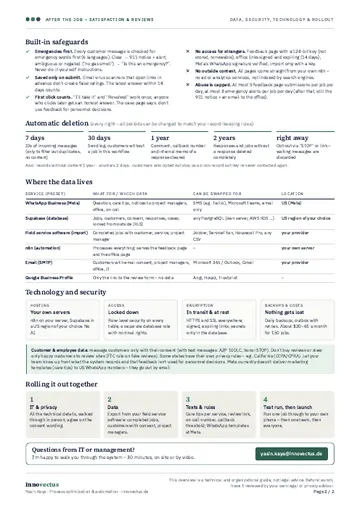
- Ready for your IT and privacy review. Comments and callback numbers are deleted after one year, feedback after two. The database runs in a US region of your choice, and outside services (WhatsApp, Google) are clearly listed. The two-page overview is in the package.
What you’ll need
| Component | Default | Privacy-friendly / your systems |
|---|---|---|
| Database | Yes, required. Supabase (US region of your choice), free up to mid-size | any PostgreSQL: your own server, IONOS, STACKIT, Azure |
| Completed jobs & customers | Import from HERO or via CSV/JSON – or the tech texts “done” on WhatsApp | Jobber, Housecall Pro, ServiceTitan – any software that exports |
| Messaging | WhatsApp Business (official Meta API) – customers only with consent | SMS, Microsoft Teams, email only |
| Your mailbox via SMTP | Microsoft 365 / Outlook, Gmail | |
| Reviews | Link to your Google Business Profile | Yelp, Trustpilot, Angi – any link works |
| AI | None needed. | – |
| Feedback & case pages | built into the automation – no web server needed | – |
| Automation | n8n, self-hosted on your own server | – |
Running costs (ballpark for 150 jobs a month, 60% of them with consent): roughly $25–50 a month for WhatsApp messages, database and server. No AI costs – and you probably already have an email account.
Prefer text messages or email over WhatsApp? WhatsApp is the default, but we can swap it for SMS (e.g. Twilio) or email during setup – customers then reply with a number or use the feedback page instead of tapping buttons; the setup guide explains what changes.
Setup: We set up the system with you and write the care tips for your most common jobs together.
Documents for IT, management & privacy
Everything that needs to be reviewed before you start – in one package, for everyone who has a say.
What’s inside
The overview is written for management and whoever handles privacy, in plain language. The rest is for your IT team.
- PDFOverview: IT & data2 pages: who sees what, where data is stored, deletion, security, rollout
- JSONWorkflow ready to importfor n8n, self-hosted – no credentials included
- SQLDatabase scriptSupabase (US region) or any PostgreSQL
- PDFSetup guide with checkliststep by step, with a self-check before go-live
Download the package
Get it right away with the code from your LinkedIn message – or have the link sent to your inbox.
Frequently asked questions
Why do unhappy customers get the review request too?
Because Google requires it: businesses can’t selectively ask only happy customers for reviews. The difference is what happens before that. Anyone who gives an 8 or lower gets a call from their project manager – usually the same day. And a customer whose problem got fixed often leaves a fair review. There’s deliberately no switch to get around this.
Does the customer need to install anything?
No. They reply on WhatsApp with a number or click a number from 1 to 10 in the email. On a short feedback page, they can add a sentence or check “Please call me.” No account, no password.
How does the system know a job is finished?
From your field service software: when a job is closed there, it comes in via import – for example from HERO or through a daily CSV export. No integration? The tech simply texts “done A-1043” on WhatsApp. That only works from registered numbers, and who sent the message isn’t stored.
Are we even allowed to ask customers how satisfied they are?
Yes – as long as customers have agreed to hear from you. That’s why the system only contacts customers who have opted in – for example with a checkbox on the work order or at the final walkthrough. Emailing existing customers without that opt-in is turned off and should only be turned on after checking with your legal counsel. If you switch to text messages, US texting rules apply (A2P 10DLC registration, honoring STOP). And the review request goes to everyone, never just to happy customers – the FTC prohibits fake or cherry-picked reviews. Some states also have their own privacy rules (e.g. California’s CCPA). This is our technical take, not legal advice.
What about customers who speak another language?
The question, replies, care tips and feedback page come set up in six languages: English, Spanish, German, Polish, Romanian and Turkish. You can add more. If a care tip isn’t available in the customer’s language, they get it in English.
What will our employees say?
Customer feedback can say a lot about individual employees. That’s why the tech isn’t stored on the job, and there are no numbers per person or crew. Satisfaction is only shown for the whole business and per type of job, and only once there are 5 responses. We recommend telling your team early on what the system records and what it doesn’t – the two-page overview in the package helps with exactly that.
We’re a small shop – is it worth it?
Absolutely – especially then. The owner is the only project manager, the techs text “done” on WhatsApp, and you write care tips for your three to five most common jobs. Evenings and weekends, your phone only buzzes for emergencies.
What does it cost?
Ongoing fees for WhatsApp, database and server run roughly $25–50 a month, and there are no AI costs. Setup and customization depend on which software you connect and how many types of jobs get care tips. You’ll get a fixed quote upfront.
Could this work for your business?
A no-obligation intro call – we’ll figure out together whether it’s a good fit.
Book a no-obligation call